Business process automation with AI: cut costs and scale faster
What it is, what you can automate, how much it saves, and how to start with AI process automation.

Business process automation with AI uses artificial intelligence to run and, more importantly, interpret business tasks that used to require a person: reading an email, classifying an invoice, validating a document, or drafting a report. Unlike rule-based automation, it works with unstructured data, understands context, and decides. For a company, that means lower operating cost, fewer errors, and the ability to scale without adding headcount.
Getting from interest to results is the hard part. Most initiatives stall in pilot and never reach the processes or the culture of the company. The World Economic Forum reports that three in four companies plan to adopt AI by 2027, though returns take time to arrive.
Table of contents
- What is business process automation with AI, and how is it different from RPA?
- How does business process automation with AI work?
- What processes can you automate with AI? Real examples
- How much can your company save with business process automation with AI?
- What do you need before you start? Data, KPIs, and people
- Where should you start with business process automation?
What is business process automation with AI, and how is it different from RPA?
Business process automation with AI combines RPA’s execution capability with cognitive technologies like machine learning and natural language processing. The result is a system that reads unstructured data (emails, PDFs, images), learns from context, and makes decisions, automating tasks that used to require human judgment.
For years, companies relied on rule-based automation (macros, scripts, or RPA) to standardize repetitive tasks. It works well when rules are fixed and data is structured. The problem shows up when a document format changes or a process needs interpretation. RPA falls short there. It executes, but it does not understand.
AI adds that layer of judgment. Here is the difference, side by side:
| Traditional RPA | AI automation | |
|---|---|---|
| Data type | Structured and fixed | Unstructured: emails, PDFs, images, audio |
| Logic | Predefined rules | Interprets context and decides |
| When something changes | Breaks, needs reprogramming | Adapts and improves with experience |
| Typical processes | Copying data, filling forms | Reviewing contracts, validating documents, complex support |
| Role | The “muscle” that executes | The “brain” that understands and executes |
How does business process automation with AI work?
An AI automation is a workflow with three pieces:
- Trigger: an event that sets it off, like an incoming email or a scanned document.
- Brain (AI): the layer that uses LLMs and machine learning to interpret unstructured data and decide what to do.
- Executor (RPA / integration): the action that runs in your systems, like creating an ERP record or sending a response.
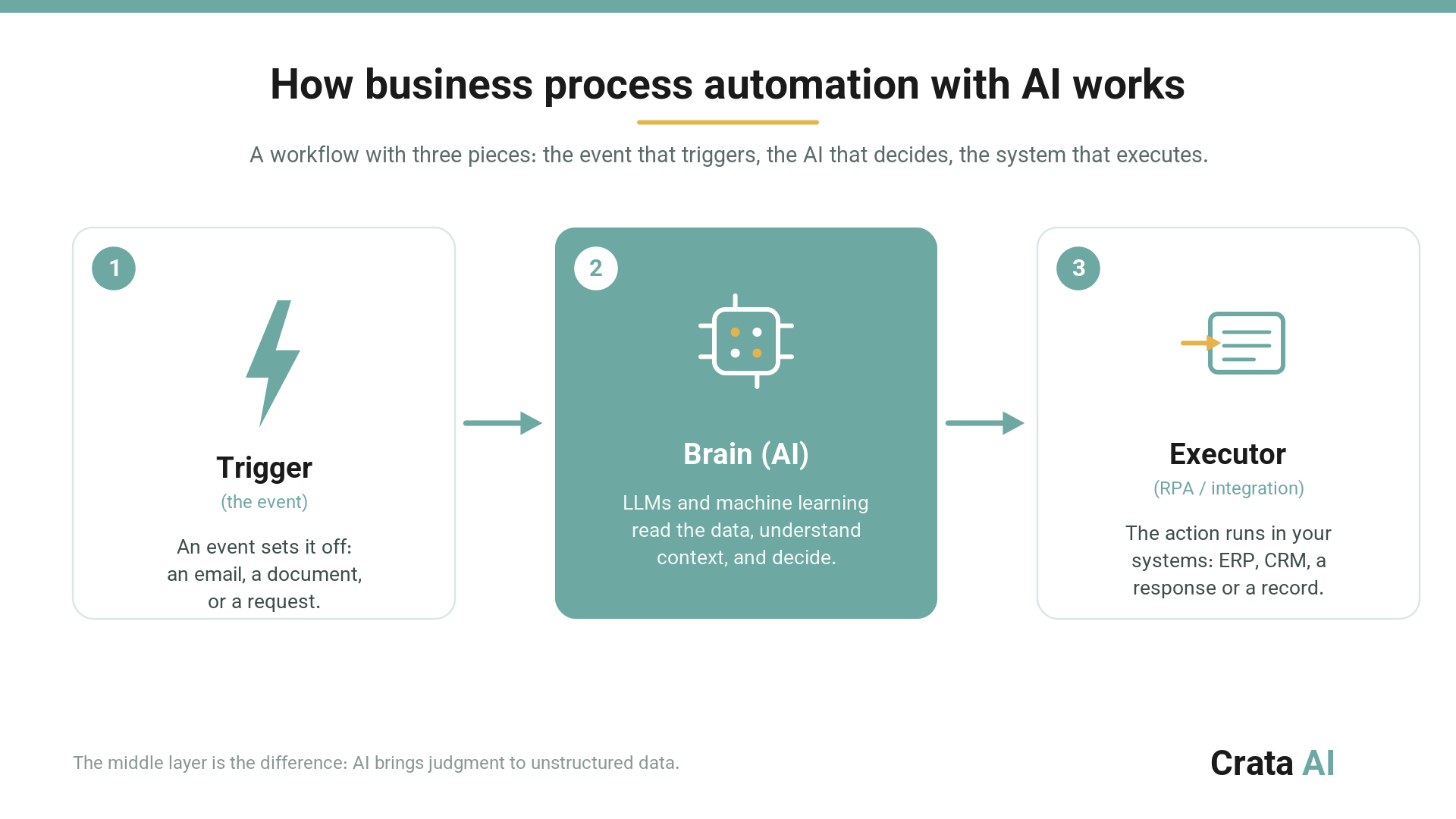
The middle layer is where the value sits. That is where AI adds adaptability: the workflow learns, adjusts, and handles complex cases without someone supervising every step.
Want to know which process in your company has the most potential? Book a call with our team and we will map it with you.
What processes can you automate with AI? Real examples
The most worthwhile processes to automate share three traits: high volume, heavy repetition, and dependence on documents or text. Here are three cases we have implemented at Crata AI.
Document analysis and classification (operations, finance, legal, HR)
The challenge: Visán, a petfood manufacturer selling across several markets, validated by hand that packaging matched the nutritional data sheet, internal rules, and regulations before every launch. Document against document, language against language. It did not scale.
Our solution: an AI agent system that compares the bag artwork against the nutritional sheet, flags inconsistencies, and produces three ready-to-use outputs for the team: an error summary, a review checklist, and the final technical sheet as a PDF. Approval stays human. The result: 93% precision in error detection, 94% sensitivity, and 60% less review time, from about 2.5 hours to roughly 1 hour per document, with 2.5x productivity. Full case in AI document validation: the Visán case, and the capability in intelligent document processing.
Intelligent project planning (construction, engineering, operations)
The challenge: with Sacyr, as part of the DesafIA Madrid initiative (selected by Madrid’s innovation office together with Wayra, Telefónica’s arm), plan preparation was highly manual. Engineers and consultants spent hundreds of hours synthesizing extensive, scattered technical documentation from past projects.
Our solution: an AI planning agent system that pulls information from internal databases, cross-checks it against client requirements, and generates standardized draft reports and plans. The result: weeks to days in deliverable preparation, with close to 95% of the compilation work automated, freeing engineers to focus on technical feasibility. It is the basis of Miranda AI, our copilot for construction planning teams. More in AI agents in construction.
Customer service and request handling (support, operations, sales)
The challenge: Tecniseguros, an insurance broker in Latin America, wanted to scale customer service without losing quality or adding headcount, especially in critical moments like claims and request handling.
Our solution: we built Leobot, a WhatsApp assistant integrated with Tecniseguros’s internal systems that guides the user, captures and structures information, and updates policy and profile data automatically. The results are qualitative but clear: instant attention with a significant drop in response time, lower manual workload (the team shifts to critical cases), 24/7 availability, and stronger consistency and traceability in every interaction. Full case in AI in insurance: the Tecniseguros case.
How much can your company save with business process automation with AI?
Savings depend on the process, but market data sets a clear reference. A study published in Science found that using ChatGPT cut task completion time by 40% and improved output quality by 18% in writing tasks. At industrial scale, the results are larger:
- Walmart cut per-unit handling cost by 20% in automated facilities versus manual ones (Supply Chain Dive).
- Amazon, with its Sequoia system, reached 75% faster inventory sorting (Reuters).
- Siemens cut automation costs by 90% with AI-powered robots at its Erlangen plant (WEF).
- AstraZeneca halved drug development time and cut ingredient use by 75% with generative AI and digital twins (WEF).
According to Deloitte, more than half of companies already allocate 21% to 50% of their digital transformation budget to AI automation.
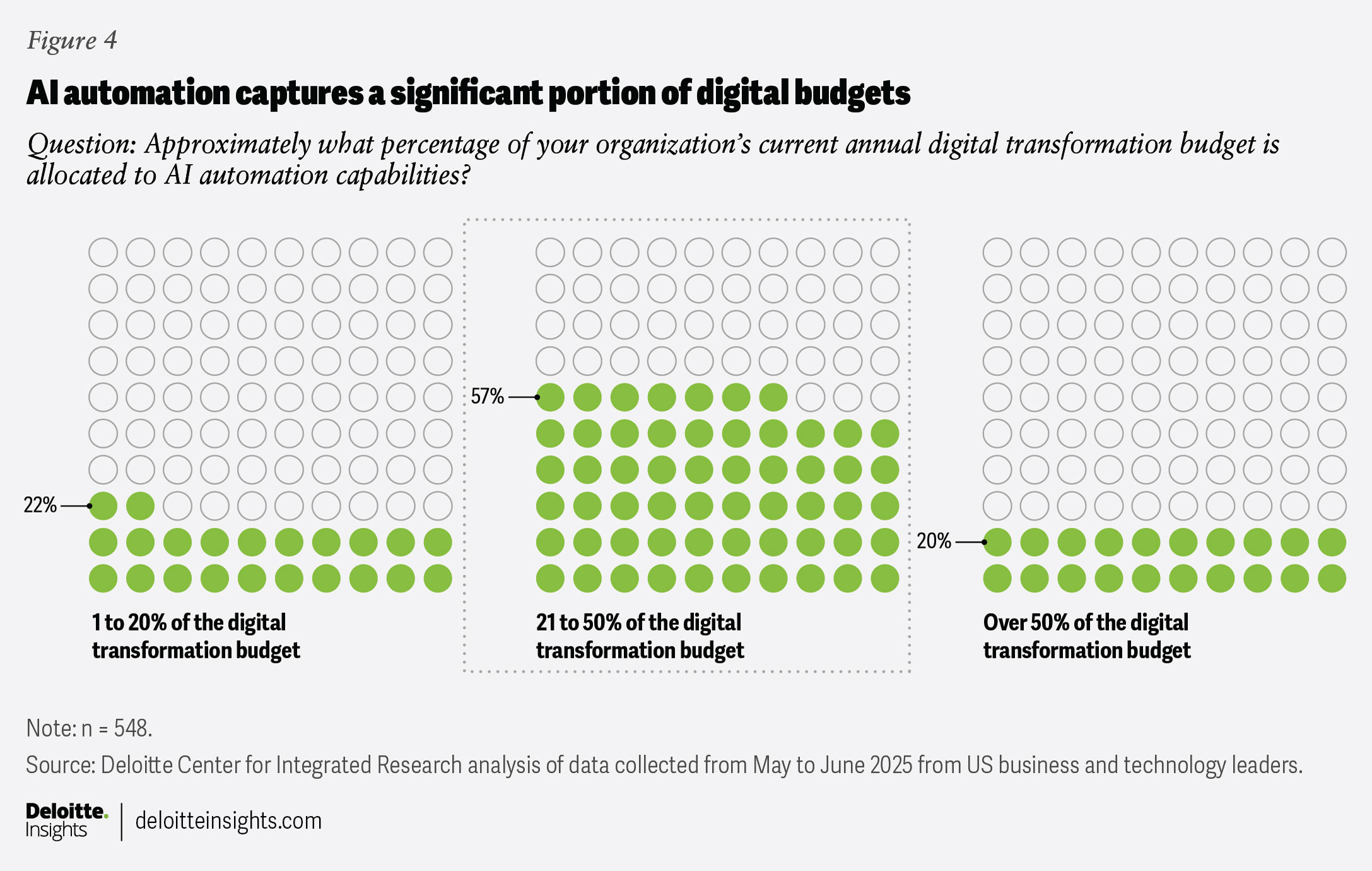
In practice, savings come through three paths: fewer errors, and with them lower costs from rework or penalties; fewer hours on mechanical tasks, which lets you scale without adding headcount; and 24/7 availability. We break down the numbers and the savings levers in cost reduction through AI.
For a deeper look at each lever, we have dedicated guides: how AI automation cuts errors and costs and how to use AI for growth, not just cost cutting.
What do you need before you start? Data, KPIs, and people
Before the model comes a less glamorous question: are your data ready? Data quality determines the performance of any AI system. Like a new hire, a model only performs if it gets structured, clean, contextualized information. The old rule still holds: garbage in, garbage out. If you want to sort this first, we walk through it step by step in get your data AI-ready.
Second is deciding what to measure. Across our implementations we define clear KPIs from the start: ROI, cost savings, error rate, and productivity, alongside technical metrics like precision, reliability, and execution time. Without a KPI, there is no way to know whether the automation works.
Third is the human factor. We design solutions with a human-in-the-loop approach: people and agents collaborate in review and improvement cycles. That way the AI learns from your organization’s real experience and the team gains judgment. The pattern we see most across implementations is consistent: the main blocker to scaling is rarely the model, it is data governance.
Where should you start with business process automation?
Once you see the potential, the question is where to begin. At Crata AI we solve this with a methodology, the AI Quickstarter, built for fast results and a safe path to scale. Three steps:
- Diagnosis (processes, teams, data): we identify the high-volume, repetitive tasks with the most room to improve, checking they fit your teams and the state of your data.
- ROI and financial assessment: we choose the pilot by its return potential, not by hype. We look for the process with the fastest, highest ROI, with leadership aligned.
- Fast execution: short pilot and test cycles to get measurable results, avoiding the classic mistake of automating a broken process or neglecting change management.
The next step: put AI at the core of your operations
Business process automation with AI is already the engine leading companies use to raise margins and grow. The question is no longer whether to integrate AI, but how to do it well and fast.
With the AI Quickstarter methodology from Crata AI you can identify in weeks which processes to automate first, estimate ROI, and begin the transition. To calculate the potential return in your case, book a free diagnostic session with a Crata AI expert. We will analyze your most resource-intensive processes, identify the first high-impact opportunities, and estimate their return. You will leave with an initial roadmap and a savings estimate.
Contact: [email protected]
Frequently asked questions about business process automation with AI
What is the difference between RPA and AI automation?
RPA follows fixed rules over structured data: it copies data, fills forms, moves files. AI automation adds a cognitive layer that interprets unstructured data (emails, PDFs, images), understands context, and decides. RPA executes; AI understands and executes. That is why AI covers processes that used to depend on a person’s judgment, like reviewing a contract or validating a document.
How long does it take to see ROI from business process automation with AI?
It depends on the process, but there are references. According to Deloitte, 45% of executives expect a return within three years on basic automation, while nearly 60% estimate longer for advanced AI projects. On high-volume, repetitive processes with a well-scoped pilot, the first measurable results usually arrive within a few weeks.
Which processes should you automate first with AI?
Those that combine high volume, heavy repetition, and dependence on documents or text: invoice processing, document validation, email classification, frequent-query responses, or report preparation. They deliver the fastest ROI and the lowest risk. The practical recommendation is to start with one scoped process and a clear KPI, measure, then scale.
Does AI automation replace employees?
Across our implementations, AI takes the mechanical, repetitive part and frees the team for judgment, customer relationships, and strategy. We work with a human-in-the-loop approach: people review, validate, and improve what the system does. The goal is for your team to decide with more context and less manual work.
Do my data need to be perfect before starting?
Not perfect, but organized. Data quality determines model performance: structured, clean, contextualized information. You do not need to solve everything at once; it is enough to prepare the data for the specific process you will automate first. An initial diagnosis tells you what you have, in what state, and what is missing.
McKinsey (2025). The State of AI in 2025: Agents, Innovation and Transformation
McKinsey (2024). The State of AI 2024: Progress and Perspectives
Deloitte (2025). AI and Tech Investment ROI: Capturing Value from Automation
World Economic Forum (2024). The Real Benefit of AI: Productivity and Knowledge
Science (2023). Experimental Evidence on the Productivity Effects of Generative AI
Supply Chain Dive (2025). Walmart’s Next Generation Automation Strategy
Reuters (2023). Amazon’s Sequoia Robotics System Accelerates Fulfillment
World Economic Forum (2024). AI Adoption Case Studies: Siemens and AstraZeneca


%20(1).png)